
Xero manufacturing software
Keep Xero. Add the factory.
Evolution runs the quoting, production, stock and delivery that Xero was never built for, and sends the invoices and bills to Xero for you. Your books, your accountant and your BAS stay where they are.
- To Xero
- 15 mininvoices and bills, or straight away
- Back from Xero
- Hourlypayments, onto the Project
Customer and supplier credit notes go to Xero too. Contacts are matched or created for you.
Who does what
Xero keeps the books. Evolution runs the work.
Xero is very good at the ledger. It doesn't know what's on the factory floor. Evolution holds the Project: the quote, the bill of materials, the production order, the stock it used and the truck it went out on. When it's time to bill, the invoice goes to Xero.
| In Evolution | Quotes, Projects, BOMs, production, stock and bins, purchasing, picking, dispatch, install, timesheets, progress claims |
|---|---|
| In Xero | Bank feeds, reconciliation, payroll, BAS lodgement, your accountant's view |
The sync
What goes across, and when.
01
Invoices and bills
Committed customer invoices and supplier bills go to Xero every 15 minutes, or straight away when you send one.
02
Credit notes
Customer and supplier credit notes follow the same path.
03
Contacts
Customers and suppliers are matched to their Xero contacts, or created in Xero with their first invoice or bill.
04
Payments back
Payments recorded in Xero come back to Evolution every hour, so the Project shows what's been paid.
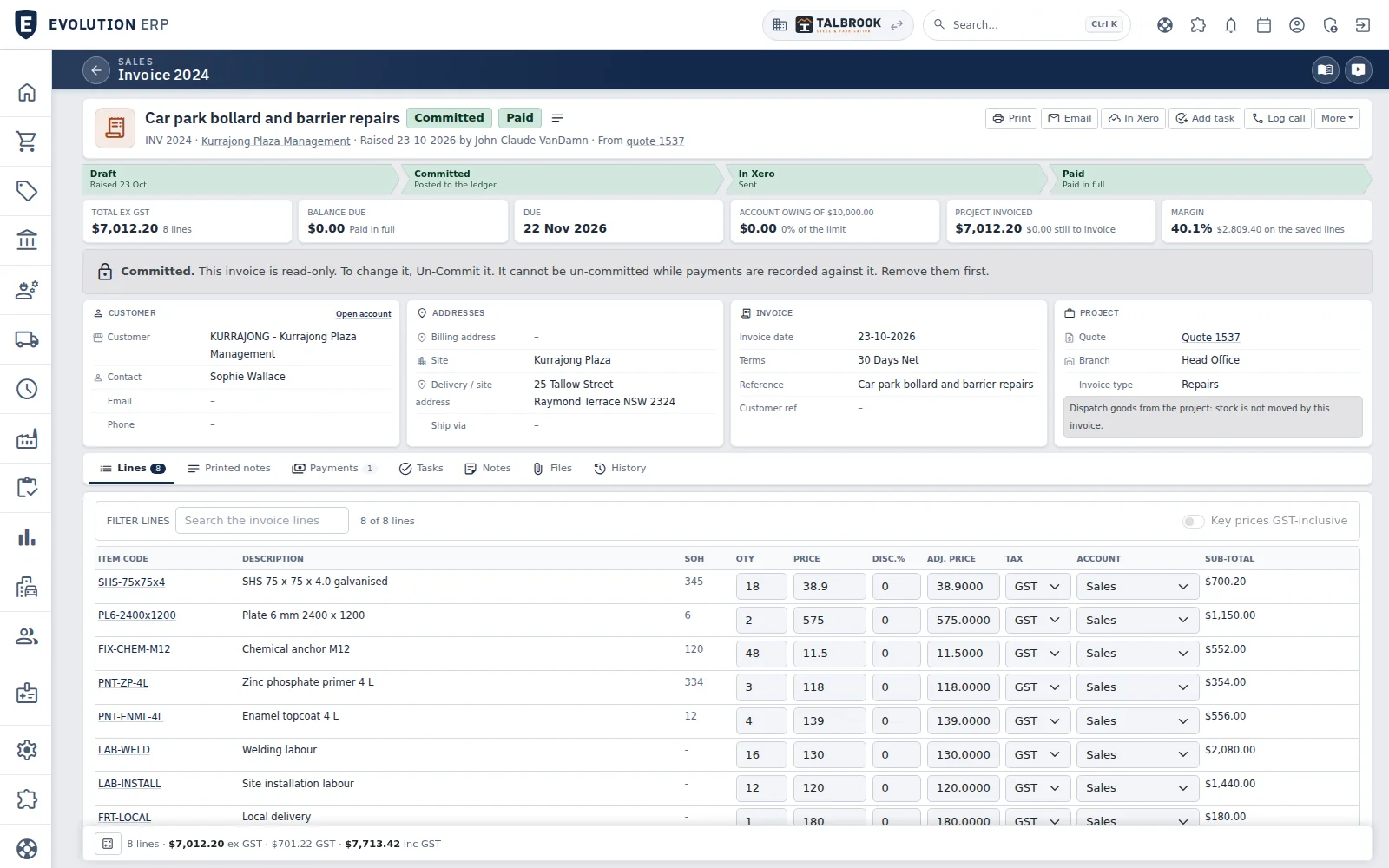
- Raised from the quote, so nothing is typed twice
- Sent to Xero from the invoice: draft, committed, in Xero, paid runs across the top
- Margin on the lines before it goes out
Billing
Invoice from the Project. Xero stays in step.
Progress claims, retentions and recurring invoices are raised in Evolution from the work you did, then go to Xero. When the customer pays and you record it in Xero, the Project shows it within the hour.
- Progress claims and retentions
- Credit notes for customers and suppliers
- Project costing and WIP
Does Xero do inventory?
Stock that knows which Project it's for.
Xero's tracked inventory counts items. Evolution tracks stock across branches and bins, with serial numbers, min/max reordering and units of measure, and allocates it to the Project that needs it.
What stays in Xero
Your books don't move.
Evolution doesn't replace Xero's ledger. Your accountant keeps working in Xero as they do now.
- Bank feeds and reconciliation
- Payroll
- BAS lodgement
- Your accountant's view
- Customer
- Olympic Group80+ admin hours a week saved
- In daily use since
- 2017by Australian manufacturers
- Releases
- Weeklynew features ship every week
- Accounting
- Xerotwo-way sync, payments back every hour
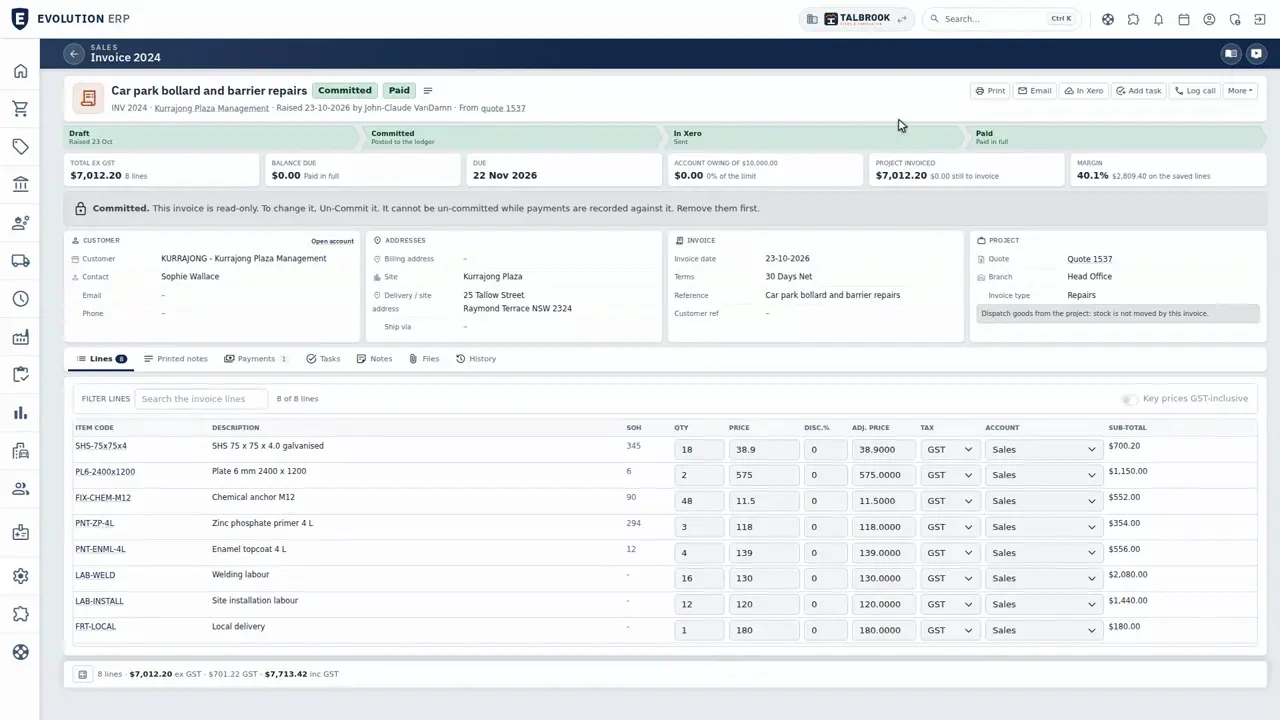
Video · 1:16
Watch an invoice go to Xero.
An invoice from the Project, progress claims with retentions, time and recurring invoices, the Xero sync, then credit notes and Project costing. Recorded on our demo company.
Questions
Xero questions
Do I have to leave Xero?
No. Evolution sends invoices, bills and credit notes to Xero and brings payments back, so your books, your accountant and your BAS stay in Xero.
How often does it sync?
Invoices and bills go to Xero every 15 minutes, or straight away when you send one. Payments come back every hour.
Does Evolution replace Xero?
No. Bank feeds, reconciliation, payroll and BAS lodgement stay in Xero. Evolution runs the quoting, production, stock and delivery, and sends Xero the invoices and bills.
Do our customers and suppliers have to be set up twice?
No. They're matched to their Xero contacts, or created in Xero when their first invoice or bill is sent.
Book a demo
See the whole flow in one demo.
We’ll walk you through a working demo company, from quote to factory to truck to invoice, and answer your questions as we go.