
Timesheets
Timesheet software for firms that quote their hours.
Quote the hours by role, book time against those same lines, approve it each week and invoice it at the quoted rate. Utilisation, bill rate and staff qualifications sit in the same system, and Xero keeps the books.
- Booked to
- The quoted labour lineso each hour is charged at the quoted price
- Approved
- Weekly, by the right managernobody approves their own time
- Measured
- Utilisation and bill ratenine time reports built in
Quote to invoice
The hours you quoted are the hours you track.
Most timesheet apps start at the timesheet. Evolution starts at the quote, so the time your people book lands on the lines the customer agreed to, at the price they agreed to.
01Quote
Hours by role
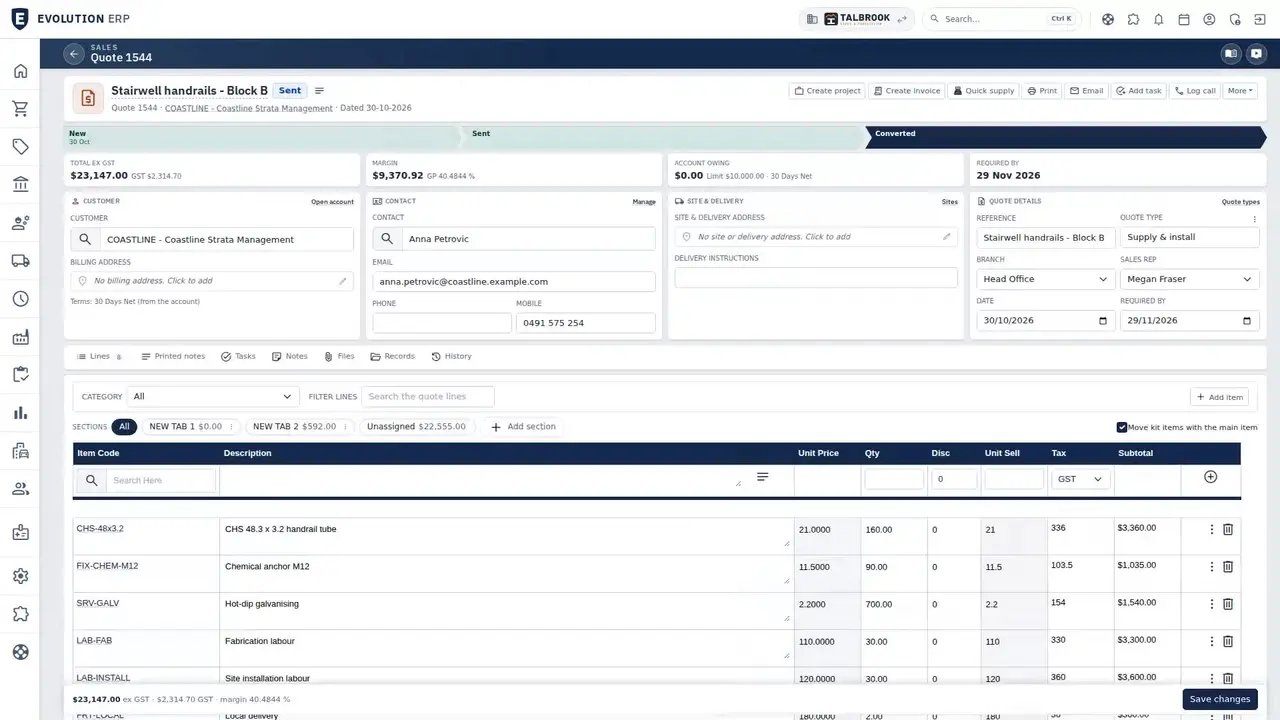
Quote a labour line for each role (senior engineer, drafter, project manager) in hours. The accepted quote becomes the Project.
02Book
Time to the line
People book their billable hours against those lines, by timer or afterwards. The rest of the day is kept as non-billable.
03Approve
Checked each week
The Project manager, a timesheet manager or a department manager approves the week's time on one screen.
04Invoice
Billed at the quoted rate
Pick the timesheets for the period on the Project's invoice. Lines come in at the quoted price and the time is marked invoiced.
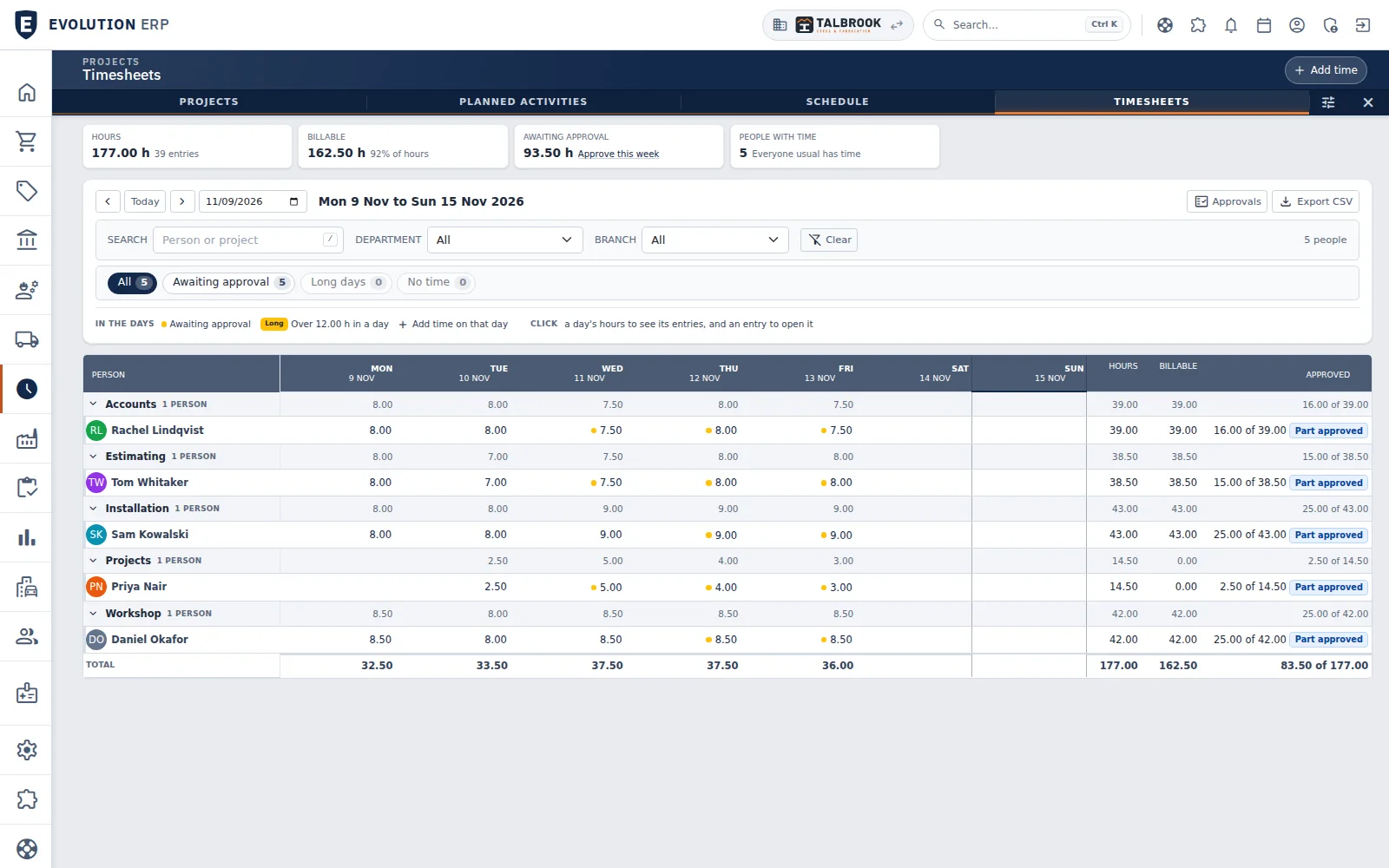
- The week's hours, billable share and time still awaiting approval
- A dot marks hours awaiting approval; click a day to see its entries
- Hours, billable and approved totals for every person
Booking time
Everyone's week on one screen.
Run the timer while you work, or enter the day afterwards with start and end times, against the Project's labour lines. The weekly view then shows each person's hours day by day, grouped by department, with billable and approved totals.
- Timer on every screen, or enter it afterwards
- Hours typed as decimals or as 1h30m
- Time before the work is won, against the opportunity
- Click a day to see its entries, or add time on that day
Where the hours went
See utilisation and bill rate without a spreadsheet.
Each hour is costed at the person's rate as it's booked, so the Project shows its labour cost alongside the hours. Nine time reports come built in.
- Employee utilisation
- Billable vs non-billable mix
- Effective bill rate, quoted vs realised
- Project labour margin
- Project run-rate against budget
- Unbilled WIP ageing
- Outstanding approvals ageing
- Missing timesheets
- Monthly billing by Project and employee
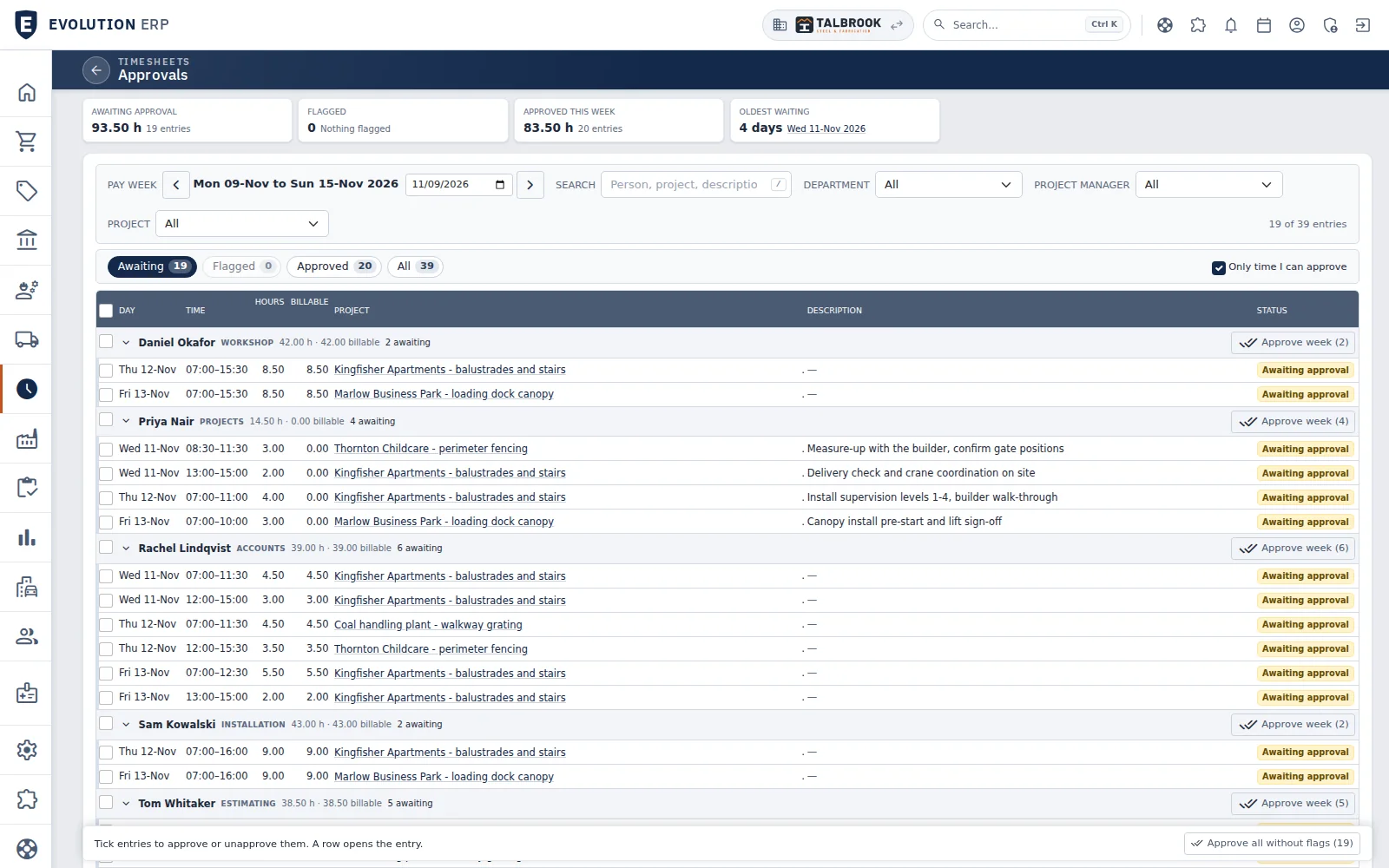
- Awaiting, flagged and approved views of the pay week
- Approve a person's whole week in one click
- Or approve everything without a flag at once
Approving time
A week of approvals in a few clicks.
Each manager sees only the time they can approve, grouped by person, with the Project and the description on every entry. Approve one entry, a person's week, or everything without a flag.
- Only the time you can approve
- Open any entry from its row
- No Project, overlaps, long days and over-billed time flagged
- Flagged entries left for a manager to tick
Controls
Time you can stand behind when the invoice is queried.
The checks a practice manager needs before time turns into money.
| Approval | By the Project manager, a timesheet manager or a department manager. Nobody approves their own time except an administrator. |
|---|---|
| Edits after approval | Your choice of setting: editing approved time resets the approval, is locked, or is allowed. |
| Invoicing | Pick timesheets by date and by approved, pending or both. Invoiced time is marked, and deleting the invoice frees it again. |
| Locking | Timesheets lock once they're invoiced, and can also lock a set number of days after they're entered. |
| Costing | Each hour is costed at the person's rate, or a default rate, and shows on the Project straight away. |
Qualifications
Licences, tickets and CPD that don't lapse unnoticed.
Every person's qualifications and licences are recorded with their expiry date and the certificate attached. The holder gets a reminder email before one expires, and the dashboard shows what's coming up.
- Expiry dates and certificates on each person
- Types that require a document before they count
- Reminder emails before expiry, or sent by hand
- Expiring-qualifications widget on the dashboard
- Qualification matrix of who holds what
- Expiring, expired and missing-evidence reports
- Renewal forecast for the next 12 months
- CPD hours logged from timesheets
CPD
CPD hours come from the timesheet.
Timesheets can record which qualifications were used and for how long, so logged hours build up against each qualification without a separate log. Expired qualifications can't be picked on new time.
Payroll
Xero keeps payroll and the books.
Evolution runs the Project time, approvals and invoicing. Payroll, bank feeds and BAS stay in Xero, where your accountant already works.
Video · 1:23
From quoted hours to the approved week.
Labour quoted by role, time booked to those lines, the week approved, servicing visits created by a schedule and licence expiry reminders, on our demo company. The video starts at the service chapter.
Questions
Timesheet questions
Can we charge different rates for different people?
Hours are charged at the price of the labour line they're booked against. Quote a line for each role, such as senior engineer or drafter, and each person books to their line.
Can we track time before the work is won?
Yes. Time can be booked against a sales opportunity, so tender and design time is recorded before it becomes a Project.
Does time have to be approved before it's invoiced?
You choose. The invoice screen picks up approved time, pending time or both, and approvals can be chased with the outstanding approvals report.
How do qualification reminders work?
The holder gets a reminder email before a qualification expires, the dashboard lists what's coming up, and expiry notices can also be sent by hand.
Does Evolution do payroll?
No. Payroll stays in Xero, along with bank feeds and BAS. Evolution sends invoices and bills to Xero and brings payments back.
Is it a separate timesheet app?
No. Timesheets are part of Evolution, with quoting, Projects, purchasing and invoicing, all in the one per-user price.
Book a demo
See the whole flow in one demo.
We’ll walk you through a working demo company, from quote to factory to truck to invoice, and answer your questions as we go.