
Project costing
Project costing software that shows what each Project really made.
Time, materials and invoices all land on the Project as the work happens, so you can see the margin and the WIP while there's still time to do something about it.
- Costs
- Time and materialson the Project as they happen
- Billing
- Claims and retentionsprogress claims, recurring invoices
- The answer
- Project costing and WIPwhat each Project made
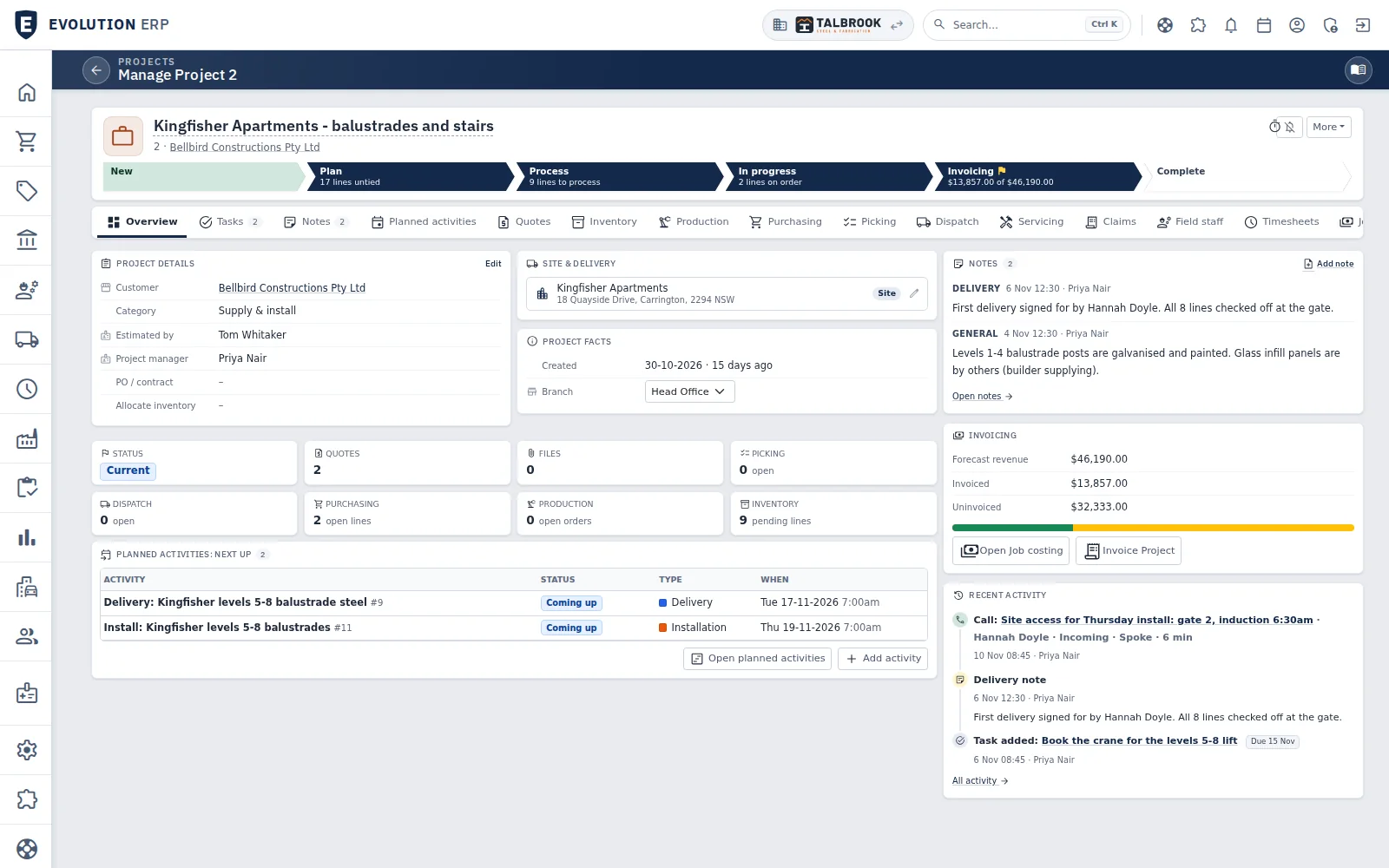
- Each stage shows what is left: lines to plan, lines to process, the amount still to invoice
- Quotes, production, purchasing, picking, dispatch and claims are tabs on the same Project
- Open quotes, picking, dispatch, purchasing, production and stock at a glance
The Project
The quote, the costs and the invoices on one record.
Because the Project came from the accepted quote, what you sold, what you spent and what you've billed sit side by side.
- What's left to make, send and invoice
- Purchasing and stock used against the Project
- Claims and invoices raised from the work
Timesheets
Every hour lands on a Project.
Workshop and site crews book their time against the Project they worked on. Labour turns up in Project costing straight away, and it is there to invoice from.
- On the floor or on site
- Run a timer while the work is happening, or enter the day afterwards, against the Project’s labour lines.
- Approved and billable
- The Project manager, a timesheet manager or a department manager approves the week’s hours on one screen, and billable and non-billable time is kept apart.
- Costed and invoiced
- Each hour is costed at the person’s rate, and invoiced time is marked so it is never billed twice.
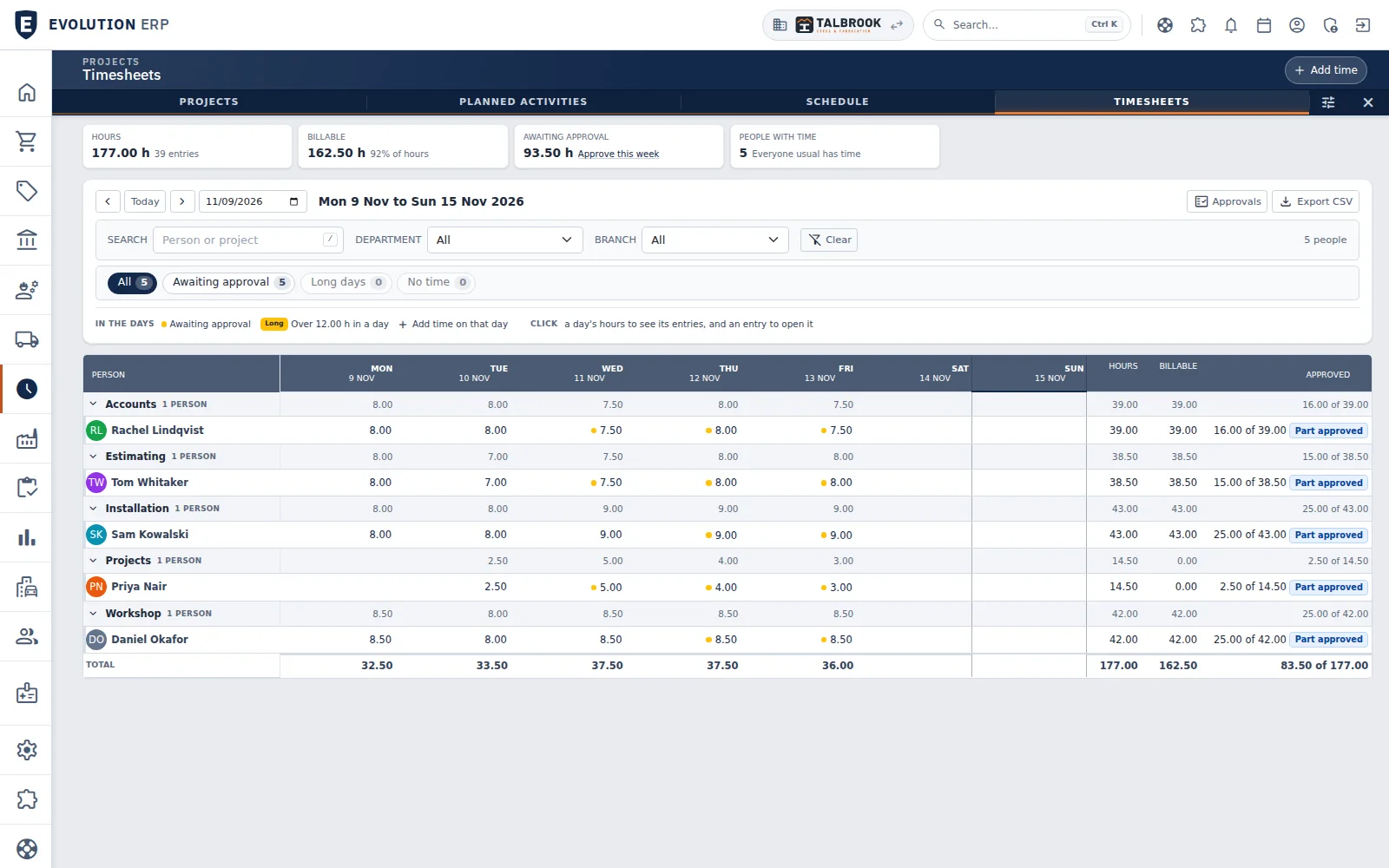
- The week's hours, billable share and time still awaiting approval
- A dot marks hours awaiting approval; click a day to see its entries
- Hours, billable and approved totals for every person
Billing
Invoice from the work you actually did.
Claims and invoices are raised in Evolution from the Project, then go to Xero.
- Progress claims
- Retentions
- Recurring invoices
- Credit notes for customers and suppliers
- Margin on the lines before it goes out
- Invoices and bills to Xero every 15 minutes
- Payments back from Xero every hour
- Project costing and WIP
Questions
Project costing questions
When can we see what a Project made?
While it's running. Time, materials and invoices land on the Project as they happen, with Project costing and WIP.
How does labour get onto the Project?
People book their time against the Project, by timer or afterwards. Each hour is costed at the person's rate.
Can we do progress claims and retentions?
Yes. Progress claims, retentions and recurring invoices are raised from the Project and sent to Xero.
Does our accountant still use Xero?
Yes. Invoices and bills go to Xero and payments come back, so your books and your BAS stay in Xero.
Book a demo
See the whole flow in one demo.
We’ll walk you through a working demo company, from quote to factory to truck to invoice, and answer your questions as we go.